

Blog

5 ways incorrect armrest positioning strains your shoulders and how to fix them

5 ways incorrect armrest positioning strains your shoulders and how to fix them

Table of Contents

  • Armrest height causes shoulder shrug
  • Strain on the rotator cuff due to overly wide armrests
  • "Floating arms" syndrome
  • Obstacles to desk proximity
  • Left-right load imbalance and posture tilt
  • HBADA Armrest Technology Comparison
  • Frequently Asked Questions
  • Summary

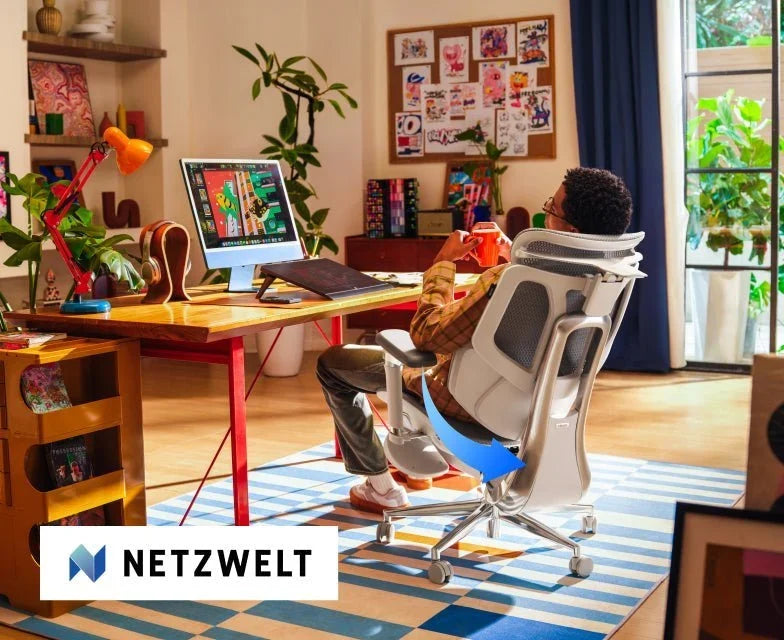
If you experience discomfort in your shoulders and neck at the end of the workday, the position of your armrests may be to blame.

Though often overlooked, armrest positioning plays a crucial role in distributing upper body weight.

Poorly positioned armrests can place undue strain on muscles, leading to fatigue and stiffness.

Here are five common chair setup mistakes that strain your shoulders, and how to fix them.


Shoulder elevation and the "shrug effect"

One of the most common problems occurs when armrests are too high.

Armrests that are too high can cause your shoulders to constantly be "shrugged," compressing the trapezius muscles and potentially impeding blood flow around the neck.

If this condition persists for several hours, muscle tension can accumulate, leading to severe stiffness and tension headaches.

Solution: Precise height adjustment

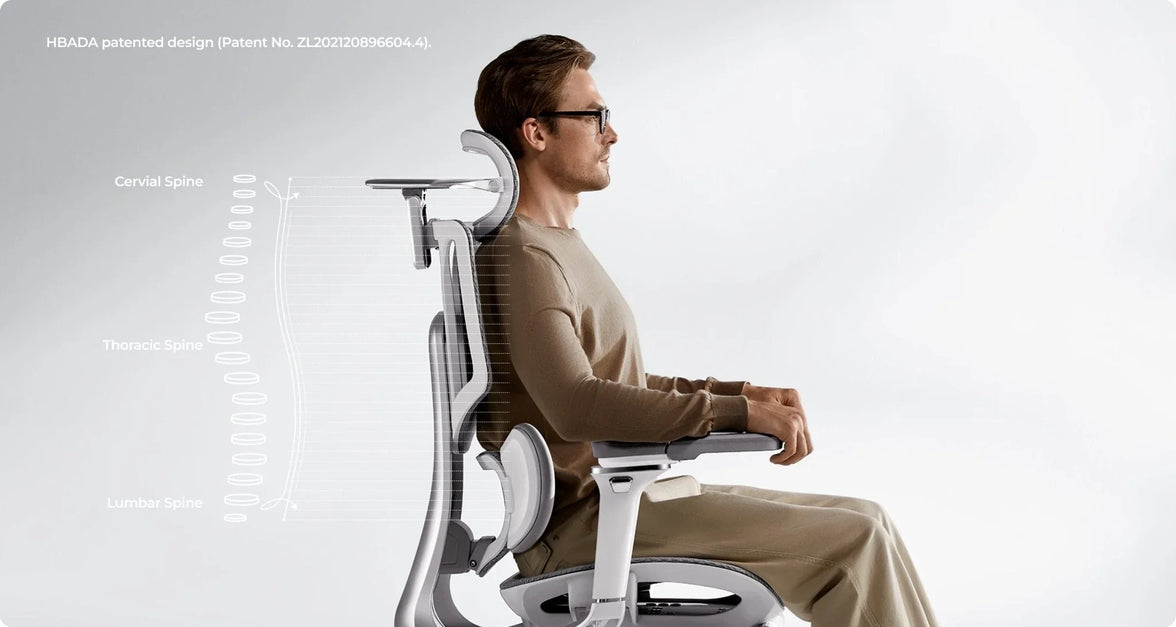
To relieve shoulder strain and support good posture, it's important to lower the armrests until your shoulders are in a natural, relaxed position.

The ideal height is when your forearms rest on the pads and your elbows form approximately a 90-degree angle.

If your chair's height adjustment range is too large to allow for fine-tuning, choosing an ergonomic chair with precise armrest positioning will make it easier to find the optimal, body-friendly height.


Overly wide armrests, "wing span," and rotator cuff strain

Many common office chairs have armrests that are too wide.

This causes your arms to splay outward and your shoulder blades to move away from your spine, putting strain on your rotator cuff and surrounding tendons.

Solution: Inward angle adjustment

Choose an HBADA office chair with multi-directional adjustment features that allow the arm pads to rotate inward.

By bringing the armrests closer to your body, you can keep your elbows naturally at your sides.

This helps stabilize the humerus within the shoulder joint, reducing long-term strain from continuously extending your arms.


"Floating Arms" Syndrome

If armrests are too low or non-existent, the weight of your arms will be supported solely by your shoulders.

Since arms can account for about 10% of your body weight, continuous downward pulling can strain ligaments and contribute to "hunchback" posture.

When your chest slumps forward, it can also disrupt the natural alignment of your spine.

Solution: Full support for prolonged work

To alleviate shoulder strain caused by office chairs, stable weight distribution is crucial.

For prolonged use, an ergonomic chair with adjustable armrests ensures that your arms are always properly supported, whether you're leaning back to read or sitting upright to type.

High-performance ergonomic chairs with full arm support adjustment provide the necessary range of adjustment to naturally bridge the gap between your body and your desk.


Obstacles to desk proximity

If your armrests hit the edge of your desk, you'll be forced to sit further away from your keyboard.

As a result, you'll be more likely to lean forward or hunch your back, which is a major cause of shoulder impingement and lower back strain.

Left-right load imbalance and posture tilt

Because most people are right- or left-handed, they may lean their weight on one armrest while the opposite arm "floats."

This can cause pelvic tilt and asymmetry in the shoulder line, potentially leading to scoliosis-like symptoms in the long run or exacerbating existing spinal disorders.

Solution: Symmetrical adjustment and core awareness

Even when using an adjustable ergonomic chair designed to reduce shoulder strain, it's important to be mindful of your body's balance.

Setting both armrests to the same height and width promotes a stable sitting posture that keeps your body centered.

This symmetrical support is especially important for those with complex physical concerns.

For example, when considering appropriate sitting positions for people with herniated discs, distributing pressure evenly on both sides is crucial for reducing spinal load.

HBADA Armrest Technology Comparison

At HBADA, we design our products to provide proactive comfort support.

We pursue armrest technology that can adapt to each user's body movements, from mild fatigue to strain caused by prolonged use.

Frequently Asked Questions (FAQ)

Q: How can I check if my armrests are at the correct height?
A: The correct height is when your elbows form a 90-degree angle with your shoulders relaxed in a natural position. Ideally, you should be able to reach your keyboard without shrugging your shoulders or dropping your elbows.

Q: Should I use my armrests while typing?
A: Yes. Using armrests while typing can support your arms and reduce strain on your back and neck.

Q: Does armrest position affect my lower back?
A: Yes. Improper armrest positioning can lead to slouching, which can put strain on your lower back.

Q: What are the benefits of "multi-directional adjustable" armrests?

A: Multi-directional adjustable armrests allow you to adjust height, width, depth, and angle, so you can set them to the optimal position for various tasks and body types.

Q: Can a better chair help with a herniated disc?

A: While not a cure, ergonomic chairs can properly support your spine and help reduce pressure on your discs.


Summary

Your shoulders already endure enough daily strain. Your office chair shouldn't add to it.

By understanding these five common armrest mistakes, you can immediately take steps to balance your body and reduce discomfort during work.

True ergonomic comfort isn't about conforming your body to the chair; it's about the chair adjusting to your body.

Choose a chair with multi-directional adjustable armrests and gain comfortable support tailored to your body.

Find the optimal ergonomic chair to reduce shoulder strain and create an environment where you can focus on what truly matters: your work and your health.


Relevant Product

You May Also Like

HBADAエルゴノミクスチェアで在宅ワークの生産性を高める方法 HBADAエルゴノミクスチェアで在宅ワークの生産性を高める方法 在宅ワークでは、通勤時間やオフィスでのさまざまな雑音から解放される一方で、別の問題が生じることがあります。それは、もともと一日中仕事をすることを想定していないワークスペースです。頻繁に姿勢を変えたり、座っていると暑さを感じたり、快適に身体を支えられるポジションがなかなか見つからなかったりする場合、本来仕事に向けるべき集中力の一部が、チェアの不快感に奪われている可能性があります。 結論: エルゴノミクスチェアを使うだけで、自動的に生産性が向上するわけではありません。しかし、自分の身体に合わせて適切に調整されたチェアは、快適な作業姿勢をサポートし、身体の動きに対応しながら、熱のこもりも抑えることで、身体的な負担や気になる要素を軽減できます。その結果、ミーティング、文章作成、分析作業など、デスクワーク中の集中力を維持しやすくなります。 以下では、エルゴノミクスチェアと生産性の実用的な関係、そして日々の在宅ワークのパフォーマンスにどのような影響を与えるのかを解説します。さらに、自分の働き方に合ったチェアの選び方と、快適に使用するための調整方法についてもご紹介します。   目次 なぜチェアが集中力に影響するのか 快適でないチェアがもたらす見えない負担 ランバーサポートが集中を妨げる要因を軽減する理由 快適な温度を保つことが重要な理由 姿勢・動き・仕事中の活力 生産的な仕事をサポートする機能 ワークスタイルに合ったHBADAチェアの選び方 集中しやすい環境をつくるチェアの調整方法 健康的なワーク習慣にはチェア以外も重要 よくある質問 チェアが思っている以上に集中力へ影響する理由 座っている姿勢を何度も気にする必要がなければ、集中力を維持しやすくなります。背中が十分に支えられていなかったり、肩が上がっていたり、座っているときに脚に不快感を感じたりすると、作業上必要な回数以上に姿勢を変えたり、身体を傾けたり、席を立ったりすることが増える可能性があります。 こうした小さな中断は、一つひとつを見ると大したことではないように感じるかもしれません。しかし、長時間の仕事では、何度も姿勢を調整することで集中のリズムが途切れ、長時間のミーティングもより負担に感じやすくなります。 これが、エルゴノミクスチェアと生産性の現実的な関係です。チェアは、避けられる身体的な負担や不快感を軽減することで、仕事に集中しやすい環境づくりをサポートします。ただし、チェアそのものがモチベーションを生み出したり、スケジュールを管理したり、仕事を代わりに完了してくれるわけではありません。 快適でないチェアがもたらす見えない負担 快適でないチェアは、一日の仕事への取り組み方にも影響する可能性があります。長時間の集中が必要な作業を後回しにしたり、重要な作業の途中で席を離れたり、ほんの数分でも楽に感じるからという理由で、不自然な姿勢を取ってしまうことがあります。 自分に合ったエルゴノミクスチェアなら、身体に合わせてワークスペースを調整できる選択肢が増えます。モデルによっては、座面の高さや奥行き、アームレスト、リクライニング、ランバーサポートなどを調整でき、タイピング、読書、ビデオ会議など、それぞれの作業に適した自然で快適な姿勢をつくりやすくなります。 大切なのは、いわゆる「完璧な姿勢」を一日中維持することではありません。生産性を支えるワーク環境には、身体を快適な状態に保ちながら、姿勢を変えたり、定期的に身体を動かしたりできる柔軟性も必要です。 ランバーサポートが身体的な負担や気になる要素を軽減 する理由 腰部とは、腰の内側にカーブしている部分を指します。背もたれがこの部分に快適にフィットしていないと、人によっては猫背になったり、座面の前方に浅く腰掛けたり、何度も姿勢を変えたりすることがあります。 調整可能なランバーサポートなら、自分の腰の自然なカーブに合わせてサポート位置を調整できます。さらに、ダイナミックサポートシステムでは、前傾したり、リクライニングしたり、姿勢を変えたりする動きに合わせてサポートが追従します。 例えば、HBADA X7 スマートエルゴノミクスチェアには、センサーと電動システムを組み合わせた、HBADA独自の「AIスマート・ランバー追従機能」が搭載されています。ユーザーの姿勢変化に応じて、ランバーサポートの奥行きを調整するよう設計されています。 一方、HBADA E3シリーズでは、機械式のアプローチを採用しています。3ゾーン・ランバーサポート設計により、中央部分のサポートと、腰まわりにフィットするよう設計された左右のサポートを組み合わせています。方式は異なりますが、どちらもチェアと腰部の接触をより安定して保つことを目的としています。 身体に適切にフィットするランバーサポートは、何度も手動で姿勢を調整する必要性を減らし、仕事中に気になる身体的な負担を軽減する可能性があります。ただし、ランバーサポートが硬すぎたり、身体を前方へ押し出すように感じたりする場合は、奥行きを浅くするか、位置を調整してください。強く押せば押すほどサポート効果が高まるとは限りません。 集中して仕事をするうえで、快適な温度を保つことが重要な理由 長時間のオンライン会議や集中作業では、熱がこもることも気が散る原因の一つになります。座面や背もたれが熱くなると、特に夏場や空気の流れが少ない部屋では、何度も姿勢を変えたくなることがあります。 多くのエルゴノミクスチェアでは、自然な通気性を高めるために通気性に優れたメッシュ素材が採用されています。現在の製品仕様によると、HBADA X7にはデュアルファンを搭載し、3段階で風量を調整できるベンチレーションシートも採用されています。 冷却機能そのものが直接生産性を向上させるわけではありませんが、暑さによって作業を中断する要因を一つ減らすことができます。ただし、座面の快適性は室温や服装、個人の好みによっても異なります。 姿勢・動き・仕事中の活力 エルゴノミクスとは、完全に静止した姿勢を保ち続けることではありません。十分にサポートされた姿勢でも、長時間同じ姿勢を続ければ不快感が生じることがあります。まずはバランスの取れた作業姿勢をつくり、そのうえで定期的に姿勢を変えることが大切です。 キーボードを使う作業では、足をしっかり支え、肘を身体の近くに保ち、肩の力を抜くことを意識しましょう。画面は、首を何度も前に曲げなくても見やすい位置に設置します。また、チェアは上半身を常に垂直に固定するのではなく、必要に応じて少しリクライニングできるものが理想的です。 身体を動かすことも重要です。米国国立労働安全衛生研究所(NIOSH)は、長時間座り続けたり立ち続けたりすることを避けるよう推奨しており、コンピューター作業者にとって短い休憩を1時間ごとに取ることが、不快感の軽減につながる可能性があると報告しています。 実際に快適で生産的な在宅ワーク環境をつくるには、身体を適切に支える設備に加えて、短時間の立ち上がり、歩行、ストレッチなどを組み合わせることが重要です。ミーティング終了後、レポートを送信した後、飲み物を補充するときなど、仕事の自然な区切りに合わせて休憩を取り入れると続けやすくなります。 クイックガイド:生産的な仕事をサポートするチェア機能 機能 実用的なメリット チェックポイント 調整可能なランバーサポート 腰のカーブを支え、何度も姿勢を変える必要性を軽減するのに役立ちます。 身体を前に押し出すことなく、腰に自然にフィットするか確認しましょう。 座面高さ調整 デスクとの高さを合わせ、足を安定して支えやすくします。 自分の身長とデスクの高さに適した調整範囲か確認しましょう。 座面奥行き調整 膝裏を圧迫せず、太ももを適切に支えやすくします。 膝裏に少し余裕が残るように調整しましょう。 調整可能なアームレスト タイピングやマウス操作中に前腕を支えます。 肩が持ち上がらず、デスクへのアクセスを妨げない高さに調整しましょう。 調整可能なリクライニング 読書、オンライン会議、短い休憩などに合わせて姿勢を変えられます。 キーボードや画面を無理なく操作・確認できる角度を選びましょう。 通気性・ベンチレーション素材 長時間座った際の熱のこもりを抑えるのに役立ちます。 ホームオフィスの室温や換気環境も考慮しましょう。 在宅ワークスタイルに合ったHBADAチェアの選び方 機能が最も豊富なチェアが、必ずしもすべての人にとって最適とは限りません。まずは、1日の作業時間、必要な調整機能、使用環境の気候、予算などを整理し、それらのニーズと各チェアの最新仕様を比較して選びましょう。 在宅ワークのニーズ おすすめモデル 主な機能 長時間の作業や頻繁に姿勢を変える方 HBADA X7 AIスマート・ランバー追従機能、ベンチレーションシート、座面奥行き調整、多方向調整アームレスト 細かな機械式調整と腰部への集中的なサポートを重視する方 HBADA E3 Pro 3ゾーン・ランバーサポート、調整可能なヘッドレスト、アームレスト、座面奥行き調整 シンプルな機能で日常的なデスクワークに使用したい方 HBADA E3 Air 3ゾーン・ダイナミックランバーサポート、通気性メッシュ、実用的な調整機能 仕事の合間に深くリクライニングして休憩したい方 HBADA E3 Ultra 3ゾーン・ランバーサポート、幅広いアームレスト調整、フットレスト機能 製品に関する注意事項: 機能、仕様、価格、在庫状況は変更される場合があります。ご購入前に、各製品ページで最新情報および選択したモデル・仕様をご確認ください。 集中しやすい環境をつくるチェアの調整方法 高い調整機能を備えたチェアでも、その設定が使用者の身体やワークスペースに合っていなければ、本来のサポート性能を十分に発揮できません。まずは、以下の手順を参考に調整してみましょう。 背もたれにしっかり身体を預けて座る。 長時間キーボード作業をする際は、座面の前方に浅く腰掛ける姿勢を避けましょう。 座面の高さを調整する。 足裏が床またはフットレストにしっかりつき、膝まわりに無理のない余裕が生まれる高さに設定します。 座面の奥行きを調整する。 太ももの大部分を支えながら、膝裏を直接圧迫しない位置に調整します。 ランバーサポートを調整する。 腰の自然な内側のカーブに合わせ、圧迫感が強い場合はサポートの奥行きを浅くします。 肩の力を抜く。 肩が持ち上がらないよう、前腕を自然に支えられる位置にアームレストを調整します。 作業機器を身体に近づける。 キーボード、マウス、モニターを、何度も手を伸ばしたり前傾したりする必要がない位置に配置します。 実際に使いながら微調整する。 普段の作業を行ったうえで、一度に複数の設定を変えるのではなく、一つずつ少しずつ調整しましょう。 より詳しい調整方法については、エルゴノミクスチェアをより快適に調整する方法をご覧ください。 チェアは健康的なワーク習慣をつくる要素の一つ 身体を適切に支えるチェアは、仕事中の身体的な負担や気になる要素を軽減するのに役立ちます。しかし、運動や休息、タスク管理、適切な労働時間の代わりになるものではありません。水分補給、睡眠、仕事量、集中作業の進め方なども、生産性に影響します。 どれほど快適なチェアでも、休憩せずに座り続けてよいというわけではありません。一日の中で定期的に姿勢を変え、短時間でも身体を動かす休憩を取り入れましょう。可能であれば、一つの姿勢を長時間維持するのではなく、座る・立つ・歩くを適度に組み合わせることが大切です。 健康に関する注意事項: エルゴノミクスチェアは、腰痛やしびれ、その他の症状を治療するためのものではありません。症状が長く続く場合、強い症状がある場合、または悪化している場合は、資格を有する医療専門家や理学療法士にご相談ください。 よくある質問 エルゴノミクスチェアは本当に生産性を向上させますか? 間接的に生産性をサポートする可能性があります。身体に合わせて適切に調整されたチェアは、不快感や熱のこもり、頻繁な姿勢変更を減らし、集中しやすい環境づくりに役立ちます。ただし、チェアだけで必ず生産性が向上するというものではありません。 長時間の在宅ワークには、どのHBADAチェアが適していますか? HBADA X7は、自動ランバー調整機能やベンチレーションシートを求める方に適した設計です。E3 ProとE3 Ultraは幅広い機械式調整機能を備え、E3 Airは日常的なデスクワークに適した、よりシンプルな構成となっています。最適なモデルは、体格、好みのサポート感、ワークスペース、予算によって異なります。 チェアを変えれば集中力不足を解消できますか? いいえ。チェアは身体的な不快感など、集中を妨げる一部の要因を軽減するのに役立ちますが、集中力は仕事量、睡眠、休憩、騒音、デジタル機器による中断、タスクの整理方法などにも左右されます。 ランバーサポートはどのように感じるのが理想的ですか? 腰の自然な内側のカーブに、無理なく心地よくフィットしている状態が理想的です。硬いものに押されて上半身が前方へ押し出されるような感覚は適切ではありません。新たな圧迫感が生じないよう、高さや奥行きを少しずつ調整してください。 通気性の高いチェアは集中力維持に役立ちますか? 通気性に優れたメッシュやベンチレーション機能付きの座面は、熱のこもりを抑え、集中を妨げる要因の一つを軽減する可能性があります。ただし、その効果は室温、服装、着座時間、個人の好みによって異なります。 新しいエルゴノミクスチェアに慣れるまで、どのくらいかかりますか? 適応に必要な期間には個人差があります。すぐに自分に合った設定を見つけられる人もいれば、座面、アームレスト、リクライニング、ランバーサポートなどを数回の作業を通して調整する必要がある人もいます。一度に一つの設定だけを変更し、痛みやしびれを感じる姿勢で使用を続けないようにしてください。 エルゴノミクスチェアを使っていても休憩は必要ですか? はい。エルゴノミクスチェアは座る姿勢をサポートするためのものであり、身体を動かす必要性をなくすものではありません。仕事中は定期的に立ち上がったり、歩いたり、姿勢を変えたりしましょう。 まとめ エルゴノミクスチェアと生産性の関係は、魔法のように生産性を高めるというものではなく、より現実的なものです。身体にフィットし、自然な動きをサポートし、避けられる不快感を軽減できるチェアなら、仕事中に集中を妨げる身体的な要因を減らすことができます。 X7の自動ランバー追従機能とベンチレーションシート、E3 Proの調整可能な3ゾーン・ランバーサポート、よりシンプルなE3 Airなど、それぞれに特徴があります。単純に機能数の多さだけで選ぶのではなく、自分の身体へのフィット感や働き方に合わせて選びましょう。 チェアを丁寧に調整し、一日の中で定期的に身体を動かしながら、仕事を妨げるのではなく、仕事を支えてくれるワークスペースをつくることが大切です。 本記事に記載されている製品機能は、執筆時点で公開されているHBADAの製品情報に基づいています。製品仕様、構成、在庫状況は変更される場合があります。   How to Adjust an Ergonomic Chair for Correct Sitting Posture and Lower Back Pain Relief How to Adjust an Ergonomic Chair for Correct Sitting Posture and Lower Back Pain Relief  Table of Contents Why Chair Adjustment is ImportantStep-by-step Guide: How to Adjust an Ergonomic Chair1. Set the Seat Height Correctly2. Adjust Seat Depth to Maintain Balance3. Fine-Tune the Lumbar Support4. Adjust Recline Angle and Tilt Tension5. Correctly Set Armrests and HeadrestWhen to Consider Upgrading Your ChairExpert Advice for Long-Term Comfort While SittingFrequently Asked QuestionsConclusion Why Chair Adjustment is Important Back pain is one of the most common problems among people who work at desks. Office workers spend an average of over 1,800 hours sitting each year, and an improperly adjusted chair can strain the lower back, neck, and shoulders. Ergonomic chairs, especially those with adjustable lumbar support, can make a significant difference. When adjusted correctly, they help maintain natural spinal alignment, improve blood circulation, and prevent long-term discomfort. Let's look at how to fine-tune your chair to achieve an ideal posture. Step-by-step Guide: How to Adjust an Ergonomic Chair for Correct Posture 1. Set the Seat Height Correctly Adjust the height so that your feet are flat on the floor and your knees are at approximately a 90° angle. The seat height should allow your thighs to be parallel to the floor. ✅ Tip: If your chair is too high, use a footrest. If it's too low, raise the height to avoid pressure on your thighs. 2. Adjust Seat Depth to Maintain Balance Ensure there is a gap of about 5-7.5 cm (2-3 inches) between the front edge of the seat and the back of your knees. This prevents restricting blood flow while providing good support for your lower back. If your chair has a seat depth adjustment feature, slide the seat forward or backward to find a position where your body feels naturally supported and balanced. 3. Fine-Tune the Lumbar Support The correct position for lumbar support is crucial for alleviating lower back strain. Adjust the height and depth of the lumbar support to firmly fit the natural curve of your spine. A comfortable office chair with adjustable lumbar support helps maintain the body's natural S-curve, reducing strain and fatigue from prolonged sitting. 4. Adjust Recline Angle and Tilt Tension Set the backrest recline angle between 95-110° to support natural spinal alignment while allowing for appropriate movement. Use the tilt tension adjustment knob to find a suitable resistance that allows you to lean back gently. Sitting with appropriate movement promotes "active sitting," which prevents stiffness caused by prolonged static sitting. 5. Correctly Set Armrests and Headrest Armrests: Adjust the height so your elbows are at approximately a 90° angle. This reduces strain on your shoulders and wrists. Headrest: When leaning back, adjust the headrest to support the middle of your head, not your neck. This provides natural neck support. ✅ Tip: A fully adjustable office chair allows you to fine-tune all ergonomic settings to your body. It's ideal for working from home or long hours at a desk. When to Consider Upgrading Your Chair If your current chair doesn't offer sufficient adjustment range or support, it might be time to consider an upgrade. Modern ergonomic chairs and zero-gravity chairs feature advanced lumbar support tracking, breathable mesh materials, and multi-point adjustments, offering comfort beyond traditional chairs. 👉 Explore the HBADA Ergonomic Chair Series:Check out HBADA office chairs like the E3 Pro, X7 Smart, and P2 Ergonomic Chairs, designed for comfort and back health during long hours of use. Expert Advice for Long-Term Comfort While Sitting Take a break every hour to stand up and stretch lightly. Adjust your monitor height to eye level to reduce neck strain. Beyond chair adjustments, ensure your desk height and keyboard position are also appropriate. Choosing a breathable mesh chair can prevent stuffiness and stiffness during prolonged use. Frequently Asked Questions (FAQ) Q: How should I adjust an ergonomic chair? For maximum comfort and postural support, it's recommended to adjust the basic components in order. Follow these five steps: Seat Height:Use the gas lift to adjust the seat height so your feet are flat on the floor and your knees are at a 90° angle. Seat Depth:Slide the seat back and forth to ensure a gap of about 5-7 cm (roughly three fingers' width) between the front edge of the seat and the back of your knees. This maintains proper blood circulation. Lumbar Support:Adjust the backrest or lumbar pad up and down to firmly fit the natural curve of your lower back. Armrests:Adjust the height so your elbows are at approximately a 90° angle. Keep your shoulders relaxed and natural. Backrest Tilt:Set the recline angle to 95°–110° to reduce pressure on the spine. Q: What is the 90-90-90 rule in ergonomics? The 90-90-90 rule is a fundamental ergonomic principle for maintaining correct posture during desk work and reducing strain on muscles and joints. It means keeping three key body joints at approximately a 90° angle: Elbows at 90°: Forearms are parallel to the desk or armrests. Hips at 90°: Thighs are parallel to the floor, forming a right angle with your torso. Knees at 90°: Lower legs are vertical, and feet are flat on the floor or a footrest. Q: How should I adjust my chair if I have back pain? If you experience back discomfort, it's crucial to adjust your chair to support the spine's natural "S-curve." Adjust Lumbar Support:Position the lumbar support at the deepest curve of your lower back (slightly above your belt line). Ideally, it should naturally fill the gap between your back and the chair. Adjust Tilt Tension (Active Sitting):Avoid sitting rigidly with the backrest fixed at 90° for extended periods. Set a slight recline of about 95°–110° and loosen the tilt tension slightly to encourage natural movement, reducing strain on the lower back. Check Foot Support:If your feet are dangling even when your desk height is appropriate, your lower back will bear the strain. Use a footrest under your desk if necessary to stabilize your weight. Q: How do I adjust my chair's back support (lumbar support)? Lumbar support adjustment methods vary by chair design, but the goal is always to maintain your body's natural alignment. Height Adjustment:Move the lumbar pad or the entire backrest up and down to align its most prominent part with the curve of your lower back. Depth/Strength Adjustment:If your chair has a lumbar adjustment dial or a dynamic tracking feature (like on the HBADA E3 Pro or X7), you can adjust the support's strength. The ideal is to provide natural support for your lower back, preventing excessive leaning forward, without being so strong that it forces your spine into an unnatural arch. Q: How can I check if my seat depth is correctly adjusted? According to ergonomic experts, the ideal seat depth leaves a gap of about 5-7 cm between the front edge of the seat and the back of your knees (popliteal fossa). If the seat is too deep, it can compress your calves and hinder blood flow. Conversely, if it's too shallow, it won't adequately support your thighs, leading to fatigue. Q: Should an ergonomic chair be fixed upright or reclined? It is not recommended to remain fixed in a 90° upright position for long periods. Set the backrest angle to 95°–110° and adjust the tilt tension at the bottom of the chair so that the backrest supports your body with appropriate resistance. This encourages "active sitting," preventing body stiffness. Q: Can an improperly adjusted chair cause shoulder and wrist pain? Yes. If armrests are too low, you'll lean forward, straining your upper back. If they're too high, your shoulders will shrug towards your ears, leading to neck and shoulder tension. Correct adjustment keeps your elbows at approximately 90°, allowing your wrists to rest naturally on the keyboard. Q: Where should the headrest of an office chair be positioned? A common mistake is positioning the headrest behind the neck. To reduce neck strain, when leaning back, adjust the headrest to support the center of your head (the occipital bone). This maintains a natural gaze and prevents forcing your neck into an awkward angle. Q: When is it time to buy a new ergonomic chair? If your current chair lacks multi-directional adjustment features like seat depth adjustment or 3D/4D armrests, if your legs go numb after about an hour of sitting, or if the backrest is flat and offers insufficient support, it's time to consider an upgrade. Modern ergonomic chairs like the HBADA E3 Pro or X7 Smart Chair feature AI-powered dynamic lumbar tracking and breathable mesh materials, making them suitable for those who sit for 8 or more hours a day. Q: How can I tell if my chair is properly adjusted? If your feet are flat on the floor and your lower back feels naturally supported, your chair is generally adjusted correctly. Q: Can an ergonomic chair really help with back pain? Yes. A properly adjusted ergonomic chair helps maintain a neutral spine, reduces pressure on spinal discs, and contributes to long-term comfort. Q: What is the best ergonomic chair for working from home? An office chair with adjustable lumbar support, breathable materials, and multi-angle recline functions is recommended. Examples include the HBADA X7 Smart and E3 Air. Conclusion An excellent ergonomic environment contributes not only to comfort but also to long-term health. Adjusting your chair to fit your body helps prevent pain, improves posture, and increases work efficiency. 🪑 Find the chair that's right for you: Explore the HBADA Ergonomic Chair Series → Best ergonomic chair of 2026? Netzwelt reviews the HBADA E3 Series – focusing on its design to reduce back and neck strain Best ergonomic chair of 2026? Netzwelt reviews the HBADA E3 Series – focusing on its design to reduce back and neck strain Netzwelt is one of Germany’s most widely read consumer technology media outlets. Its readers are careful in their product choices, prioritizing “what features it actually has” over brand claims. When Katrin Starke, a writer for Netzwelt, covered the launch of the HBADA E3 series, the article began by focusing on a common problem many readers had experienced: "Sitting in an ill-fitting chair for hours, the back strain and discomfort don't just disappear quickly." This perspective set the tone for the entire article that followed. Key Features of E3 Pro as Evaluated by Netzwelt Central to Starke's evaluation of the E3 Pro was a design philosophy that particularly resonated with Netzwelt's readers: The ability to achieve high adaptability through precise mechanical structures alone, without relying on electronic controls. The "Bio-synchronized design," which works in conjunction with human body movements—meaning a highly precise mechanical structure that adjusts finely to body movements—eliminates the need for potentially faulty sensors, software that requires updates, or electronic components that degrade at a different rate than the chair itself. For German users, who prioritize engineering reliability, this design philosophy was highly praised. The 3-zone lumbar support with floating side wings, dual-axis headrest, height-adjustable backrest, seat depth adjustment, and dual 360° rotating armrests in the HBADA E3 Pro are all based on mechanical structures. This design achieves high precision while minimizing the risk of failure associated with electronic components. Netzwelt described the E3 Pro as a "chair that adapts to the body without delay." This is not just a marketing phrase, but a functional description of how the excellent bio-synchronized mechanical structure works in actual use. E3 Air Features and Suitable Users Starke clearly explained which users the E3 Air is suitable for. This kind of straightforward and easy-to-understand product guidance is one of the reasons Netzwelt's readers appreciate it. Rather than treating the E3 Air as merely a "lower-priced model" or "inferior to the Pro," it was introduced as an option based on differences in usage style. For those who don't spend 8 continuous hours at their desk but want a chair for various scenarios like working from home, breaks, gaming, or reading, the E3 Air's design philosophy is more suitable. Netzwelt particularly praised the 140° zero-gravity reclining function and 5-position lock. Its distinguishing feature is that it can be used as a "proper relaxation space" for breaks, not just for posture adjustment during work. Another highlight was the CloudMesh 4-way stretch material. It offers superior flexibility and breathability compared to conventional mesh materials, making it suitable for Germany's climate with hot summers and cold winters. Netzwelt also appreciated its ability to dissipate heat while preventing the direct sensation of cold drafts. Furthermore, the SGS Class-4 certified gas lift and quiet PU casters were also mentioned. These features indicate that the chair is designed for daily, long-term use, not just as a short-term display chair. Why This Review Is Important for the European Market The HBADA E3 series was launched in Germany on April 2, 2026. Netzwelt's review was published to coincide with the launch, reaching business users and remote workers actively considering ergonomic chairs precisely when HBADA entered the market. Starke's article was not an over-the-top promotion. It clearly introduced the features of each model, their suitable users, and the design philosophy behind each product. Such a practical and objective review from a trusted German specialist media outlet is more valuable than a merely long and enthusiastic article. Because Netzwelt's readers have a keen eye for discerning the essence of a product. Explore the HBADA E3 Pro → Explore the HBADA E3 Air → ※This article includes content based on a paid tie-up with Netzwelt (Germany). Publication date: March 26, 2026 Editorial views within the article are those of Netzwelt and Katrin Starke. For more details: "Get a 50 Euro launch discount now: HBADA addresses back and neck pain" Frequently Asked Questions Is the HBADA E3 Pro the best ergonomic chair for back pain in 2026? For those who work at a desk for 6-10 hours a day, the E3 Pro is one of the most complete mechanical ergonomic chairs in its price range. With 3-zone floating wing lumbar support, a dual-axis headrest, seat depth adjustment, and 360° rotating armrests, it comprehensively addresses posture changes that occur during prolonged sitting. It features a bio-synchronized ergonomic design and is certified by IGR (Institut für Gesundheit und Ergonomie – German Institute for Health and Ergonomics) and BIFMA X5.1-2017. What are the differences between the HBADA E3 Pro and E3 Air? The E3 Pro is designed for long hours of use (6-10 hours a day), emphasizing precise adjustment of each support area. In contrast, the E3 Air is intended for lighter use and versatility, focusing on breathability and comfort during recline. With 140° zero-gravity recline and CloudMesh 4-way stretch material, it’s a comfortable chair not only for focused work but also for breaks. Does the HBADA E3 Pro have electronic or AI features? No. The E3 Pro has a completely mechanical structure and does not use sensors, motors, or software. This is an intentional design; its bio-synchronized mechanical structure adapts to body movements without electronic components. AI-powered automatic lumbar tracking is a feature exclusive to the HBADA X7 Smart Chair, for users who prefer automatic adjustments. Is E3 Air’s CloudMesh superior to typical mesh materials? Yes. According to HBADA’s material tests, the CloudMesh 4-way stretch material used in the E3 Air shows an 83% improvement in elasticity and breathability compared to conventional unidirectional mesh. It achieves a balance that prevents heat buildup during prolonged use while reducing discomfort from cold drafts due to room temperature changes. What certifications does the HBADA E3 series hold? Both models of the E3 series have obtained the following certifications: BIFMA X5.1-2017 certification (durability standards for commercial office chairs, including over 100,000 impact tests) IGR certification (assessment of lumbar support by the German Institute for Health and Ergonomics) SGS Class-4 gas lift certification (over 120,000 durability tests, explosion-proof design) TÜV Rheinland structural safety certification These are verified by third-party testing organizations, not self-declared by the manufacturer. What is the warranty period for the HBADA E3 Pro? The E3 Pro offers a 5-year warranty on major components (base, gas lift, casters). Other components come with a standard 3-year warranty. For orders in Europe, HBADA ships from its EU warehouse, ensuring warranty support and replacement parts can be provided with minimal international shipping delays.